-
Step 1: Lock Out, Tag Out, Verify Dead—with a Meter You Trust
-
Step 2: Confirm the Input Supply Before Diagnosing Anything Else
-
Step 3: Test the Sensors—Start with the Inductive Sensors
- Step 4: See What Your Meter Can't—Use the Oscilloscope
-
Step 5: Put the Suspect Board Under a Microscope Before Replacing It
-
Step 6: Confirm the Suspect Component with the Right Instrument
-
Step 7: Do the Total Cost Math Before You Call a Vendor
-
The Mistakes I Keep Seeing on Breakdown Calls
Every hour of unplanned downtime at our plant costs roughly $4,000 in lost production. I keep that number in my head because it decides how much effort a repair deserves. It's also why my first move during a breakdown isn't a phone call to an outside vendor. It's a diagnostic sequence I've built from 300+ breakdown callouts over 12 years as an electrical technician.
In March 2024, a carton conveyor lost its drive motor at 2:30 on a Friday afternoon. The production shift started at 6:00 PM. The plant manager's first instinct was to call in an electrical contractor. Quote: $1,200 just to show up, then parts and "emergency response" markup on top. Another technician and I ran a quick set of tests instead. In 40 minutes we found the fault—a failed M18 inductive sensor on the infeed. Replacement cost: $80. The line was running again by 4:10.
When I'm triaging a machine-down call, the first question isn't "what's broken?" It's "what's the cheapest path to running again?" That's not the same as "what's the cheapest repair." It's total-cost thinking, and it's why this checklist exists. Run these seven steps in order before you spend a cent on a contractor.
Step 1: Lock Out, Tag Out, Verify Dead—with a Meter You Trust
Skip this step and nothing else matters. Lock out the energy source, tag the disconnect, and verify the circuit is actually dead. The "verify dead" part is where shortcuts show up. A non-contact voltage tester is a quick gross check, not final confirmation. Your DMM is the final confirmation.
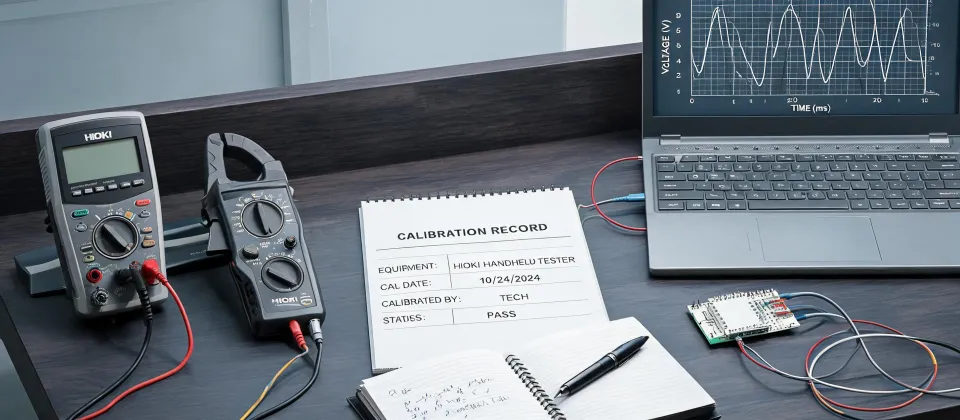
The meter you carry needs a CAT rating that matches the environment. For most industrial distribution work, that's CAT III, as defined in IEC 61010-1. The Hioki DT4222 digital multimeter I keep on my belt is rated CAT III 600 V. It's compact enough that it doesn't get left in the toolroom, which matters more than any single spec on the datasheet.
Check phase-to-phase, phase-to-neutral, and phase-to-ground before touching anything. Good, 0 V. Now you can actually work.
(Note to self: I keep meaning to swap the probe tip on channel 2—the hook's been bent since last year. Does the job fine, just makes me twitch.)
Step 2: Confirm the Input Supply Before Diagnosing Anything Else
It sounds too simple to be a "step," but a surprising percentage of machine-down calls turn out to be a tripped breaker, a blown fuse, or a loose terminal at the disconnect. The drive has no power. The PLC has no power. The sensor has no power. None of it is broken—the supply just isn't there.
Measure incoming line voltage at the main disconnect first. Then trace it through the string: fuses, contactors, terminal blocks, right up to the input of the control circuit. What I mean is, don't stand at the PLC trying to read logic states while the machine's own supply breaker is open. Confirm the basics before hunting for exotic faults.
For this job, a compact Hioki digital multimeter like the DT4222 is ideal—not for any exotic reason, but because it's the meter that actually gets carried to the machine. Its high input impedance is also a plus; it won't load the circuit while you're tracing a suspect supply line.
Step 3: Test the Sensors—Start with the Inductive Sensors
In my experience, inductive sensors fail more often than any other component on a packaging line. They're mounted at the physical edge of the machine, exposed to washdowns, vibration, and the occasional forklift. Cables get pinched. Faces get cracked. Targets get bent out of sensing range.
Testing one takes about two minutes—or rather, five if you have to dig the junction box out from behind a guard panel. Here's the sequence:
- Measure the supply voltage across the sensor's power pins. Most industrial sensors run on 10–30 V DC. No supply, no sensor fault; the problem is upstream.
- Set your DMM to DC volts and measure between the sensor's output pin and its common return.
- Pass a piece of steel across the sensor face—a wrench, a bolt, whatever is on the bench. The output should switch cleanly between its two states.
- Repeat the test a few times. A sensor that sometimes switches and sometimes doesn't is still a failed sensor, even if it passed on the first try.
One caveat: inductive sensors have a defined sensing distance (typically 2–8 mm for M8–M18 cylindrical housings). If a mounting bracket loosens or the target gets bent, the sensor won't trigger even though the electronics are perfectly good. Check the mechanical gap before you condemn the part.
Step 4: See What Your Meter Can't—Use the Oscilloscope
A DMM gives you an RMS number. It doesn't tell you about ripple, switching noise, glitches, or a PWM signal that's gone missing. Intermittent faults and control gremlins rarely show up on a multimeter; they show up on a scope.
How to Use a Tektronix Oscilloscope for a Quick Troubleshooting Pass
This applies to any brand, but since Tektronix scopes are everywhere, I'll use one as the example:
- Compensate the probe. Connect the probe tip to the scope's built-in 1 kHz square-wave terminal and adjust the trimmer until the waveform corners are perfectly square. Skipping this makes every reading suspect.
- Set the probe to 10x. The 10:1 setting loads the circuit far less than 1x. Double-check that the channel input on the scope is also set to 10x, or your measurements will be off by a factor of ten.
- Connect the ground clip to the circuit's common. Never float the ground clip on a live rail.
- Set the vertical scaling so the signal fills a comfortable portion of the screen, set the timebase fast enough to see the detail you care about (e.g., 1 ms/div for ripple), and adjust the trigger until the waveform is stable.
- If you're looking at a DC supply rail, switch the input coupling to AC. That blocks the DC component and shows the ripple and noise riding on it. A clean 24 V rail should look like a flat line at 0 V in AC mode. Ripple above roughly 100–200 mV is worth investigating.
The surprise wasn't the failed sensor in March—those fail all the time. The surprise was how often the scope catches things a DMM reports as "fine." A PLC can misbehave for weeks because of a noisy 24 V rail that reads 23.9 V on a multimeter but carries 2 V of ripple you can see clearly on a scope.
Step 5: Put the Suspect Board Under a Microscope Before Replacing It
When the fault is inside a control board—an input card, a drive, a VFD panel—stop probing blindly and look at it. Not from arm's length. Put it under a stereo microscope and go over the suspect areas one by one. We use a Carl microscope on the repair bench, and it has paid for itself more times than I can count.
At 10–20x magnification, the things you'd otherwise miss become obvious:
- Bulged or leaking electrolytic capacitors—a classic failure on older drives
- Cracked solder joints, especially around connectors, relays, and anything heavy
- Burnt resistors and scorched traces that look normal to the naked eye
- Cold solder joints: dull, cracked, or ring-shaped
The visual step feels slow when production is waiting. It's faster than replacing an expensive drive and discovering the original was fine. I've made that mistake more than once. Not proud of it, but honest.
Step 6: Confirm the Suspect Component with the Right Instrument
Once the visual inspection narrows things down, confirm the specific fault before ordering a replacement.
The Hioki DT4222 digital multimeter handles the electrical checks well—voltage, current, continuity. But for passive components, you need the right tool. A capacitor that looks perfectly fine can be open, shorted, or down to a fraction of its rated capacitance. Trying to measure capacitance on a multimeter's resistance range is a waste of time; bench work calls for an LCR meter.
This is where the broader Hioki line matters. The same manufacturer that makes the pocket-size DT4222 also makes LCR meters, insulation testers, data loggers, power quality analyzers, and clamp meters. If you're building out a test bench from scratch, standardizing on one brand keeps calibration cycles, accessories, and documentation consistent. That's a total-cost-of-ownership win that a line-by-line price comparison never shows.
Step 7: Do the Total Cost Math Before You Call a Vendor
Price is not the same as cost. Total cost of ownership includes the base price, the callout fee, the parts markup, the hours your staff spends coordinating, and the cost of the line staying down while you wait for a truck to arrive.
Last quarter alone, our team handled 34 breakdown callouts. We called in a vendor for six of them. The other 28 were fixed with less than $150 each in parts, a couple of standard instruments, and the steps above. Meanwhile, a $300 "flat rate repair" quote turned into $640 once the $150 diagnostic fee, $90 emergency callout, and marked-up sensor were added. Nobody was ripping anybody off. We just looked at the headline number instead of the total.
Flip side: there are times when calling a vendor IS the lower-total-cost choice. If you have no spare parts, no documentation, and no one on site with the right skills, a contractor is the cheapest path. The point isn't "never call a vendor." The point is to run the full-cost calculation before you decide—not to default to whatever quote arrives first.
The Mistakes I Keep Seeing on Breakdown Calls
Using the wrong meter category. A general-purpose meter with no CAT rating printed on it does not belong on a distribution panel. Use a CAT III-rated instrument (per IEC 61010-1) or check the manufacturer's markings. This isn't a paperwork detail; it's a safety boundary.
Replacing sensors without testing the supply first. A new sensor that fails immediately usually means the wiring or supply is the real problem. Confirm 24 V at the sensor terminals with your DMM before clipping in the new unit.
Skipping the oscilloscope entirely. Want to know what "how to use tektronix oscilloscope" actually saves you? It saves you from replacing a PLC card because of a problem a scope would have found in a minute. Any decent scope works—Tektronix or otherwise.
Going straight to board replacement. Swapping a control board may clear the symptom but hide the root cause: a failing power supply, a chafed cable, a marginal component. Diagnose first, replace second.
That's the checklist. It has taken me through hundreds of breakdown calls, from a $25 sensor swap to a full line restart. Run the steps in order, confirm each finding with the right instrument, and you'll find most electrical faults before lunch. And if you do have to bring in outside help, you'll make that call with a precise description—and a much better idea of whether the quote is actually worth paying.